Every device covered in this article is a legitimate, commercially available product used by cybersecurity professionals for authorised testing. We describe them here so you know what they look like, what they can do, and how to protect against them — not to enable misuse.
The Threat Has Gone Physical
Most cybersecurity awareness focuses on the digital: phishing emails, weak passwords, unpatched software. These remain critical. But there is a parallel threat that gets far less attention — physical attack hardware that can compromise a system, network, or building in seconds, often without leaving any trace in your logs.
The devices covered in this article are not custom-built by nation-state hackers. They are sold openly online, have active hobbyist communities, tutorial YouTube channels, and ship within a week. Prices range from under $100 to a few hundred dollars. Some look like ordinary consumer electronics. That is precisely what makes them dangerous in the wrong hands.
Understanding what these tools are — and what they can do — is the first step to making your practice, office, or business a harder target.
01 — Flipper Zero
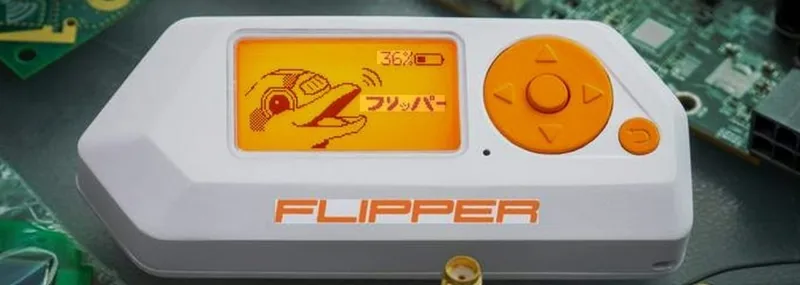
At first glance, it looks like a children's game — a small orange device with a dolphin mascot on a pixel display. Do not be fooled. The Flipper Zero is a portable, programmable multi-tool capable of interacting with a remarkable range of radio frequencies and protocols. It has become one of the most widely discussed security research tools in recent years, and for good reason.
In the right hands, it can read and clone the RFID card used to enter your building, replay the IR signal from your air conditioning remote, intercept Sub-GHz signals from garage door openers, and emulate contactless bank cards for NFC testing. It can even act as a USB HID device — making a connected computer think a keyboard is typing commands.
The legitimate use case is security research and authorised penetration testing. The concern for businesses is that someone with a Flipper Zero can casually walk past your reception desk and silently read the access card in your pocket or wallet without you knowing.
If your building uses older RFID access cards (125kHz EM4100 or HID Prox formats — very common in South African commercial buildings), they can be cloned silently at close range. An attacker who brushes past you in a corridor could walk back in after hours with a copy of your card. Upgrade to MIFARE DESFire or equivalent encrypted card systems, and combine with PIN entry for sensitive areas.
02 — The O.MG Cable
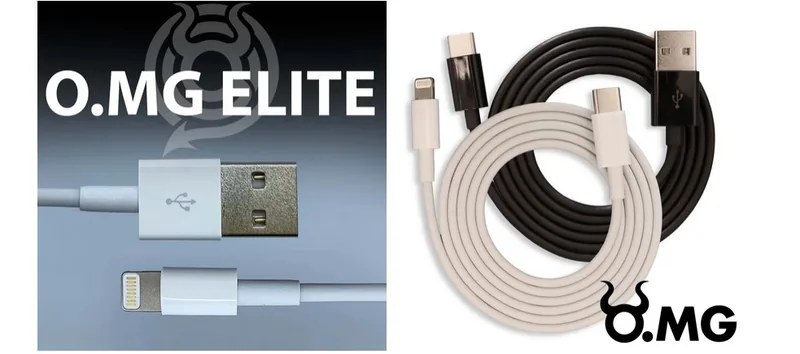
This is the one that tends to shock people the most when they first encounter it. The O.MG Cable — created originally as a security research tool by researcher MG — is a USB charging cable that is, to all external appearances, completely indistinguishable from the cable that came in the box with your phone or laptop. Same feel, same weight, same connectors.
Inside the cable's connector housing — a space smaller than a fingernail — is a fully functional microcontroller with built-in WiFi. When plugged into a computer, the cable can present itself as a keyboard and type pre-programmed malicious commands at machine speed. The attacker can trigger payloads remotely over WiFi, from up to about 90 metres away, without being anywhere near the target machine.
The attack vector is simple: leave a cable in a conference room, hand one to a colleague as a "spare," or swap it on someone's desk. Most people have several cables lying around and wouldn't think twice about picking one up.
Only use charging cables you purchased yourself and have kept in your possession. Never plug in a cable given to you by someone else, found at a conference, or borrowed from a shared space. This applies to your phone, laptop, and any device that accepts USB. A USB data blocker ("USB condom") can also prevent data transfer through an untrusted cable, though it won't protect against a cable that masquerades as a keyboard.
03 — USB Rubber Ducky

Plug a USB drive into a computer and Windows immediately asks what to do with it. But plug in a USB Rubber Ducky and Windows sees a keyboard — and keyboards are trusted unconditionally. No warning, no prompt, no security scan. The Ducky begins typing pre-loaded commands at up to 1,000 keystrokes per second, far faster than any human. Within seconds, it can open a terminal, download and execute a payload, create a new administrator account, exfiltrate saved passwords, or establish a persistent backdoor — then sit silently as an apparently empty flash drive.
The attack requires physical access to an unlocked machine. Five seconds is enough. An unattended reception computer, a laptop left open at a café, a workstation whose user stepped away for a moment — these are the opportunities. The Ducky has been around in various forms since 2010 and remains one of the most effective physical attack tools available precisely because of how computers fundamentally trust keyboards.
04 — WiFi Pineapple
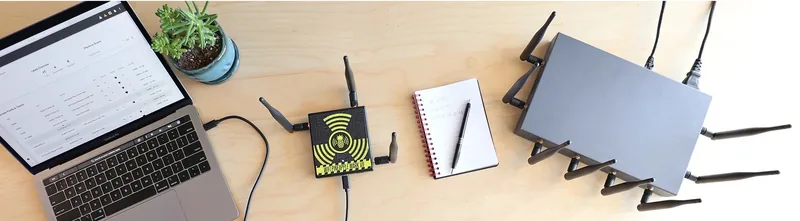
Your phone and laptop remember WiFi networks they've connected to before, and they quietly broadcast the names of those networks looking for them. The WiFi Pineapple listens to these broadcasts and responds — pretending to be every network your device is looking for. Your device connects automatically, without any prompt, because as far as it knows it found a trusted network.
Once connected through the Pineapple, an attacker can inspect all unencrypted traffic, strip HTTPS from connections that don't enforce HSTS, capture credentials entered on login pages, and inject malicious content into web pages you visit. It broadcasts from a device small enough to fit in a bag, plugged into a powerbank, operating silently in a waiting room, car park, or adjacent office.
This is why public WiFi carries real risk — and why even "secure" environments can be compromised if someone gains physical proximity to the building.
05 — Four More You Should Know About
Bash Bunny
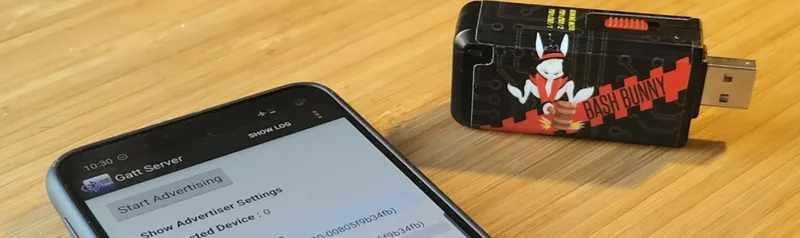
Think of the Rubber Ducky's more capable sibling. The Bash Bunny can simultaneously emulate a keyboard, a network adapter, and a USB storage device. This means it can both inject keystrokes and exfiltrate files over a spoofed network connection in the same attack sequence. It runs a full Linux operating system and can execute complex multi-stage attack scripts. Used by professional penetration testers for physical access assessments.
Proxmark 3
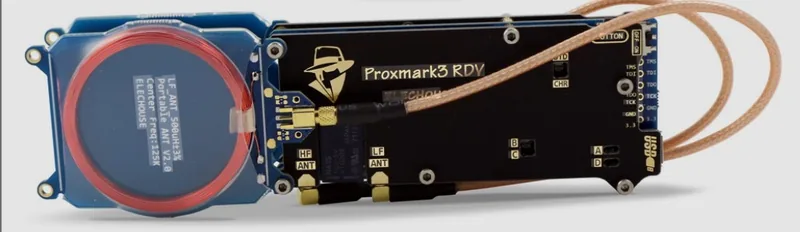
Where the Flipper Zero is a generalist, the Proxmark 3 is a specialist. It is the professional tool of choice for RFID and NFC security research, capable of reading, cloning, emulating, and analysing a wide range of contactless card systems — including many that are used for building access, loyalty programmes, and transit cards. The Proxmark can work on encrypted card formats that the Flipper Zero cannot, making it significantly more capable against hardened physical access systems. Used extensively by professional security teams doing physical penetration tests.
LAN Turtle
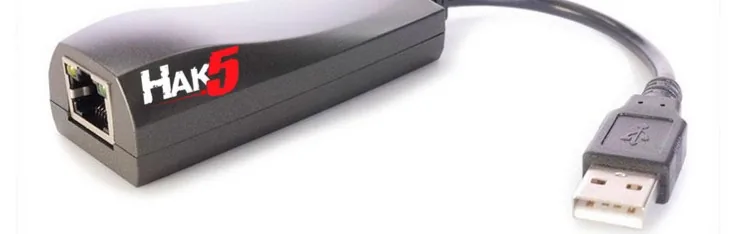
The LAN Turtle disguises itself as a USB Ethernet adapter. It plugs into a USB port on a target computer, with an Ethernet cable connected between it and the wall. To the machine, it looks like a network adapter. In reality, it's a covert implant sitting between the computer and the network, capable of intercepting traffic, providing remote access to the attacker over the internet, and running automated attack modules. Once physically planted — which takes about five seconds — it can persist undetected for days or weeks.
Screen Crab & Packet Squirrel
Rounding out the Hak5 toolkit: the Screen Crab ($100) is a covert HDMI man-in-the-middle implant that records or streams whatever is displayed on a monitor — planted between a screen and a computer, it captures everything shown on that display and can exfiltrate it over WiFi. The Packet Squirrel ($60) is a similar implant for network cables, designed to silently capture network traffic or create a VPN tunnel back to an attacker for ongoing access. Both are small enough to be hidden behind a monitor or under a desk.
Notice what all of these tools require: brief physical access. A moment alone with a computer, a cable lying on a desk, walking past someone in a corridor, sitting in your waiting room. This is why physical security — who enters your premises, what they can touch, and what your staff notice — is as important as any software control.
What Vigilance Actually Looks Like
Awareness is step one. But awareness without action doesn't protect you. Here's what you can do to reduce your exposure to physical attack tools — most of which costs nothing.
Physical Security Basics
- Lock screens when you step away. Windows+L takes one second. An unlocked, unattended machine is an open door to every USB-based attack described here.
- Control USB access. Consider USB port blockers for computers that don't need removable storage, or group policy settings that restrict which USB device classes can connect. Reception computers especially should not accept arbitrary USB devices.
- Own your cables. Never plug in a cable you didn't purchase yourself. Keep your own cables labelled. Be particularly cautious with cables received as gifts, found in conference goody bags, or borrowed from a shared drawer.
- Audit who enters your premises. The most sophisticated physical attack tool is useless if the attacker never gets through the door. A visitor log, escorted access for non-staff, and a culture where staff challenge unfamiliar faces are all effective controls.
- Check what's plugged in. Periodically look at what is connected to the USB and Ethernet ports of computers in your practice, particularly machines in less-monitored areas. A LAN Turtle or Bash Bunny is only effective if nobody looks behind the machine.
Network & Wireless
- Segment your guest WiFi. Any network accessible to patients, visitors, or anyone outside your staff should be completely isolated from your practice systems. A WiFi Pineapple in your waiting room cannot reach your clinical network if they're properly segmented.
- Disable auto-connect on work devices. Configure staff laptops and phones to not automatically connect to open or remembered networks without confirmation.
- Use a VPN on public or untrusted networks. If your staff work from coffee shops, hotels, or anywhere that isn't your office network, a VPN is non-negotiable.
Access Control
- Audit your access card system. If your building uses older 125kHz RFID cards, they can be cloned by the Flipper Zero and Proxmark with minimal effort. Ask your access control provider what card technology you're using and whether it supports encrypted authentication.
- Combine card access with PIN for sensitive areas. A cloned card alone cannot satisfy a two-factor access system. Server rooms, file storage, and admin areas benefit significantly from dual-factor physical access.
How Exposed Is Your Practice?
A physical penetration test from Greyhat4Hire uses these exact tools — legally, with your permission — to show you precisely which of these attacks would succeed against your business before someone with bad intentions tries them.

Independent cybersecurity practitioner and practicing dentist based in Umhlanga, South Africa. Founder of Greyhat4Hire. Two decades of precision in both disciplines — including hands-on physical penetration testing using the tools described in this article.
About Dr Sykes →